Most people pick this
Quick and easy
Fun facts, new words and quick maths. About 10 seconds a question. Nothing to study, just a moment to think.
Coming soon to Android
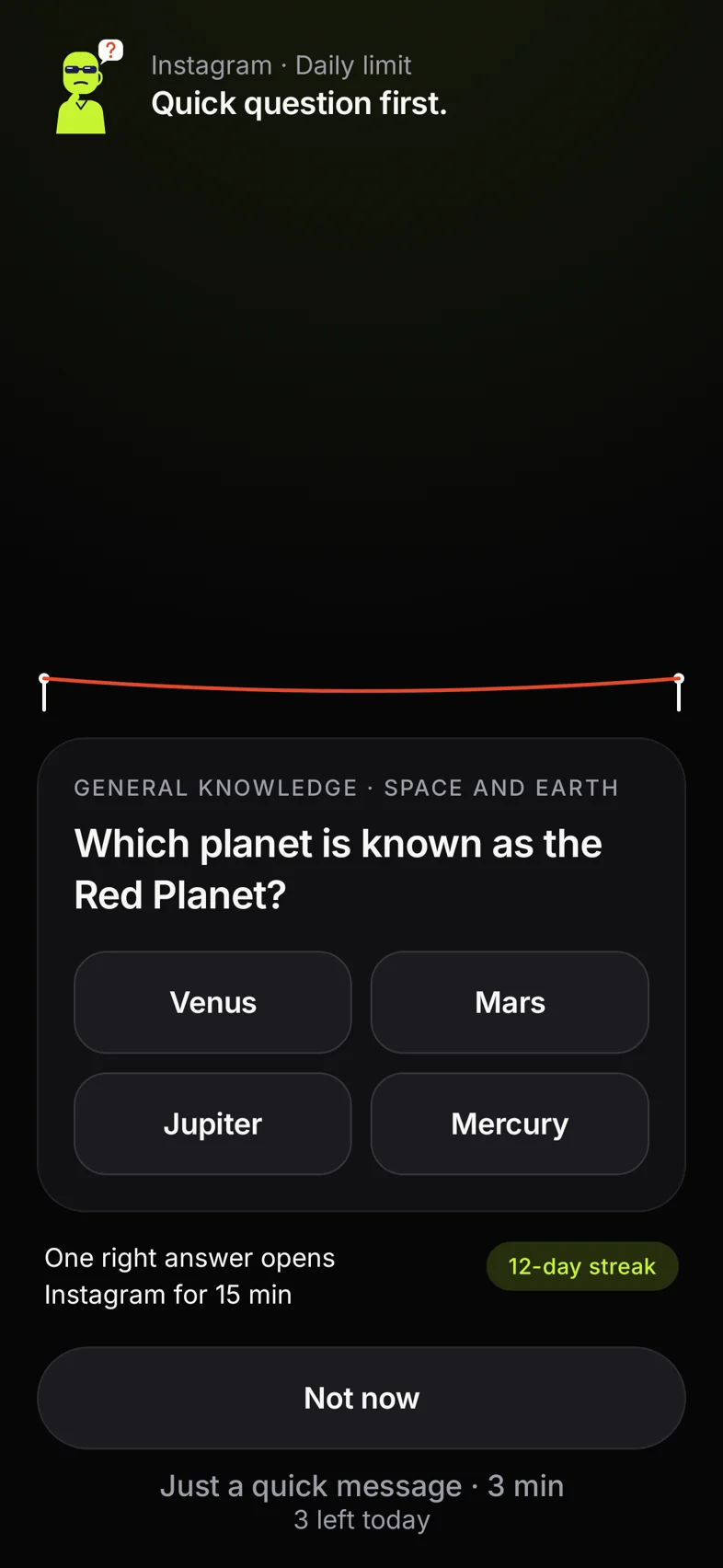
Before Instagram opens, Bouncer asks one quick question. Take a breath, learn something small, then choose: go in on purpose, or walk away.
A friend sent you here. Joining with their link moves them up the list.
Almost ready
Bouncer is still setting up the line. Come back in a little while and add your name.

We'll tell you when ScrollBouncer opens on Android.
Your invite link
Invite 3 friends who join with your link and get 1 month of Pro free at launch. Every friend also moves you up the list.
Free forever plan , No ads , Works offline , English, தமிழ், हिन्दी
How it works
Most times we open Instagram, we didn't decide to. It's a habit, not a choice. Bouncer gives you the choice back.
01
Instagram, YouTube, a game: the ones you open without thinking. Bouncer is waiting at the door.
02
A fun fact, a new word, a quick sum, or a question from your exam. About 10 seconds.
03
Get it right and you're in for the minutes you set. Or tap Not now and get on with your day.
Why it's different
A wall makes you angry, so you take it down. Bouncer interrupts the habit, teaches you something small, then lets you choose. That's why it lasts.
| Most apps say | ScrollBouncer says |
|---|---|
| Control your screen time | Reclaim your time |
| Block distractions | Interrupt unconscious habits |
| Pause before opening | Pause and learn something |
| Focus on productivity | Focus on being present |
| Track your usage | Celebrate time away |
What you learn
In setup you choose what Bouncer asks. Change it any time.
Most people pick this
Fun facts, new words and quick maths. About 10 seconds a question. Nothing to study, just a moment to think.
Questions from your exam, picked for your year or class.
English, quick maths and aptitude. Spoken English for interviews, emails and calls.
Cricket, cooking, history: type any topic, and AI writes the questions.
2,466
questions ready to go: 1,116 built in, plus 1,350 in 9 free exam packs
30 days
before a question you got right comes back. No repeats.
3 languages
The app speaks English, தமிழ் and हिन्दी. Questions are written in English; maths, aptitude and GK can be shown in Tamil or Hindi too.
The packs
Every answer is checked before a pack ships. Each exam pack shows its level, its version and whether a teacher has reviewed it yet. Spot a mistake? Report it from the question, and we aim to fix it within 48 hours.
NEET Biology150
NCERT level , Teacher review pending
Physics (Class 11–12)150
NCERT level , Teacher review pending
Chemistry (Class 11–12)150
NCERT level , Teacher review pending
Maths (JEE Main)150
NCERT · JEE Main style , Teacher review pending
Class 10 Maths & Science150
NCERT · CBSE Class 10 , Teacher review pending
Reasoning (SSC & Bank)150
CGL / IBPS pattern , Teacher review pending
UPSC General Studies150
Prelims level , Teacher review pending
GATE CS150
GATE level , Teacher review pending
Spoken English150
Everyday English , Teacher review pending
Try it
Pick a pack and answer five, right here. This is the pause Bouncer puts in front of your apps.
The same questions as in the app, with the answers shuffled every time.
Pick a pack
Wrong answers teach too
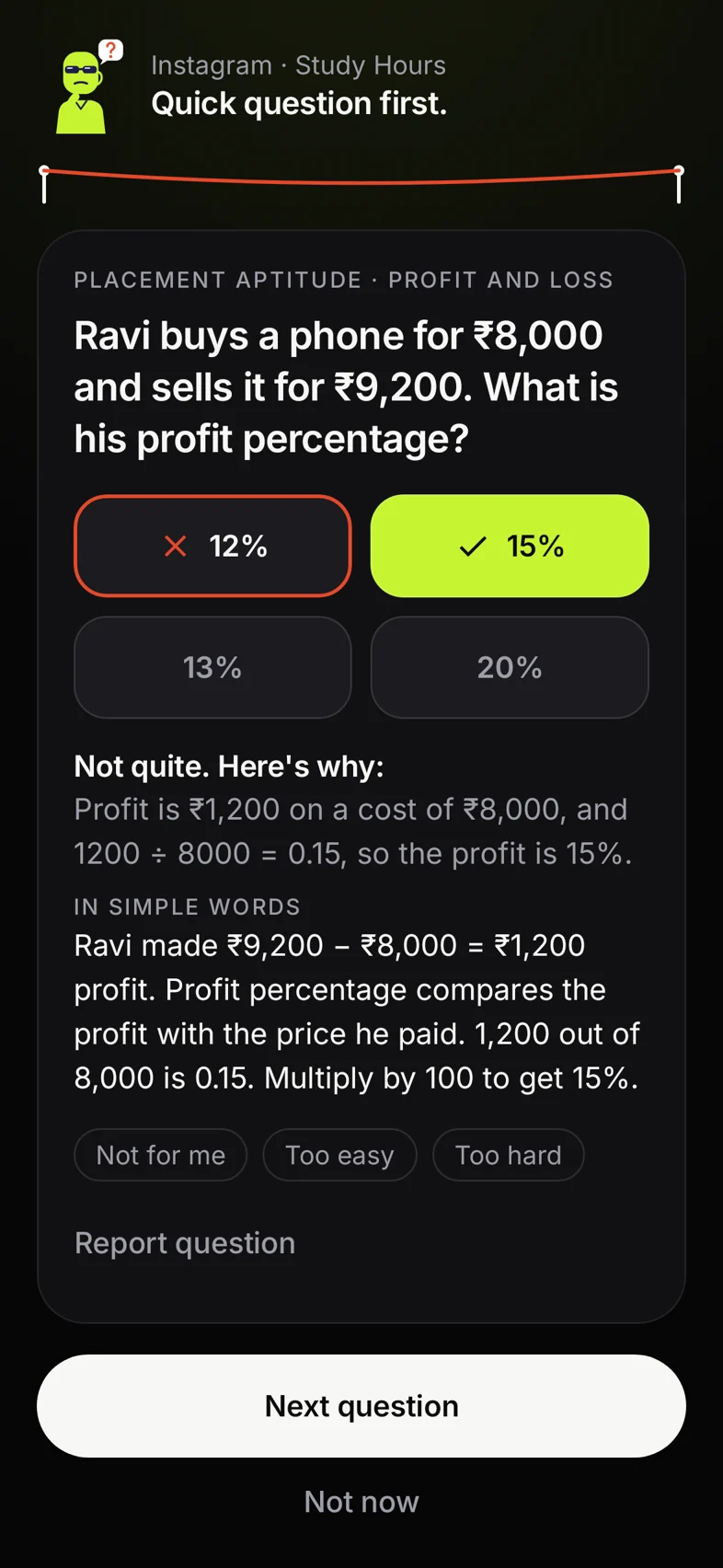
A short explanation, then a fresh question. No lecture, no shame. And the next time it comes up, you'll know it.
Beyond the lock
The question at the lock is the start. When you want more, the Learn tab is there.
Whenever you like, with no app to unlock. A ring shows how far you've got in each pack.
Questions you got wrong come back later as a quick review, so they stick.
Type a subject, like Spanish or cricket, and AI writes questions for it. They're marked “Written by AI”.
Take a photo of your notes or pick a PDF, and get questions from them. Pro.
Nine free packs, each with its level, its version and its teacher review status.
Three short lines on Sunday from your week's totals. Off unless you turn it on. Never sees app names.
Not now
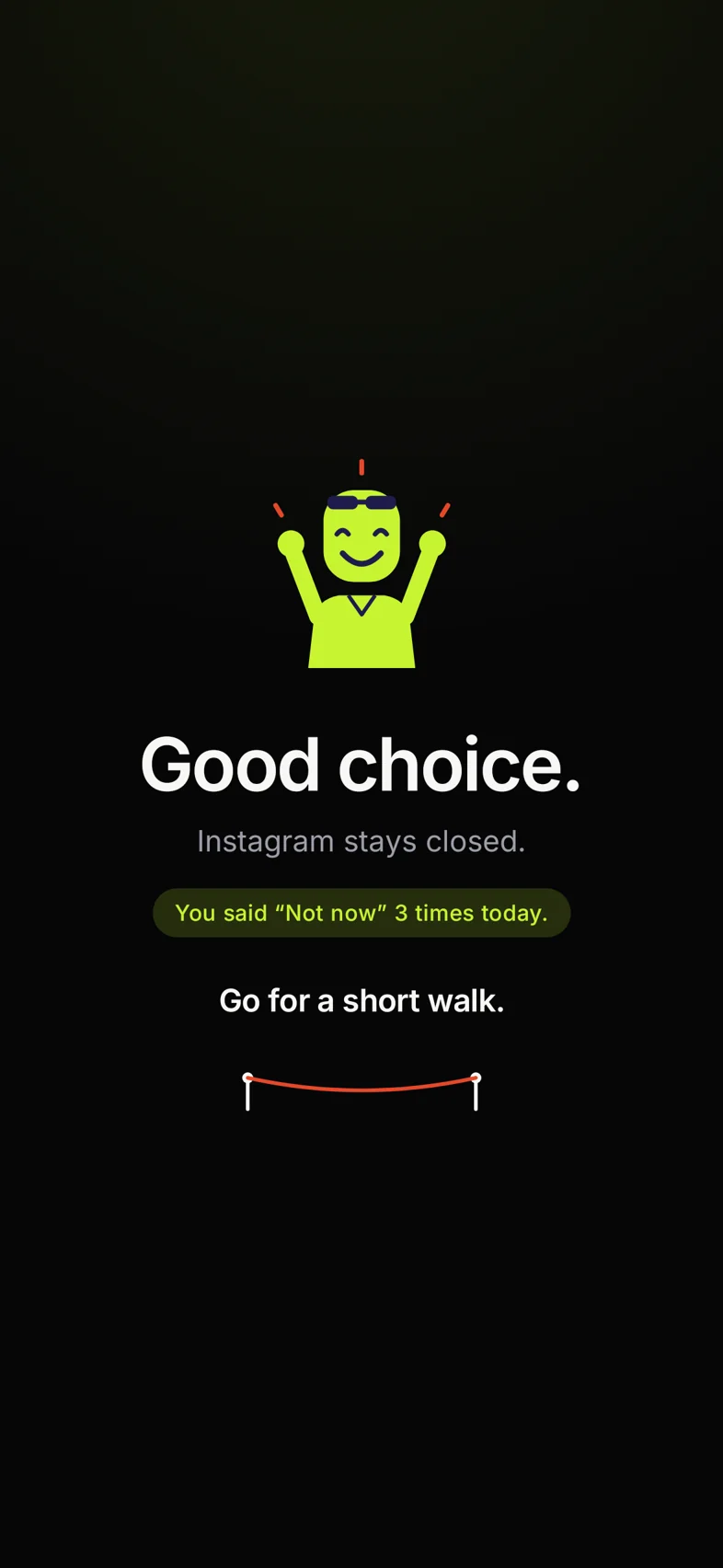
Tap Not now and Bouncer says so. Then one small idea for the moment: go for a short walk, drink some water, back to your books.
Every Not now is counted, so you can watch the habit get stronger, day by day.
Celebrate time away
Every Not now is time back for something real. And when your week really had less scrolling, Bouncer celebrates it on Home: “Time back this week.” Only then.
Dinner, a talk, a chapter. The feed can wait.
Ten minutes outside beats ten minutes of reels.
The question warmed you up. Keep going.
When you do go in, it's a choice, not a reflex.
Fair timer
Your unlocked minutes run only while the app is on your screen. Step away to reply to a message and the clock waits for you.
An unlock you don't come back to ends after 30 minutes away. Restarting your phone ends it too.
Example : a 10 minute unlock
8 min left
You used 2. The 5 minutes away cost you nothing.
Routines
Pick a ready-made routine or make your own. Several can run at once, and the strictest setting always wins.
Weekdays, 9 to 5. Fewer, shorter unlocks while you study.
10:30 PM to 7 AM. Feeds stay closed. Calls, maps and payments stay open.
45 minutes a day, shared by all your apps. Each unlock gets a little harder.
One tap for 25, 50 or 90 minutes of deep work. Your apps wait until you're done.
1 to 8 hours with no shortcuts, for the day it really matters.
For real messages
Need to reply to one message? Open the chat app for 3 minutes with no question. 3 a day, never a way round your limits.
Honest numbers
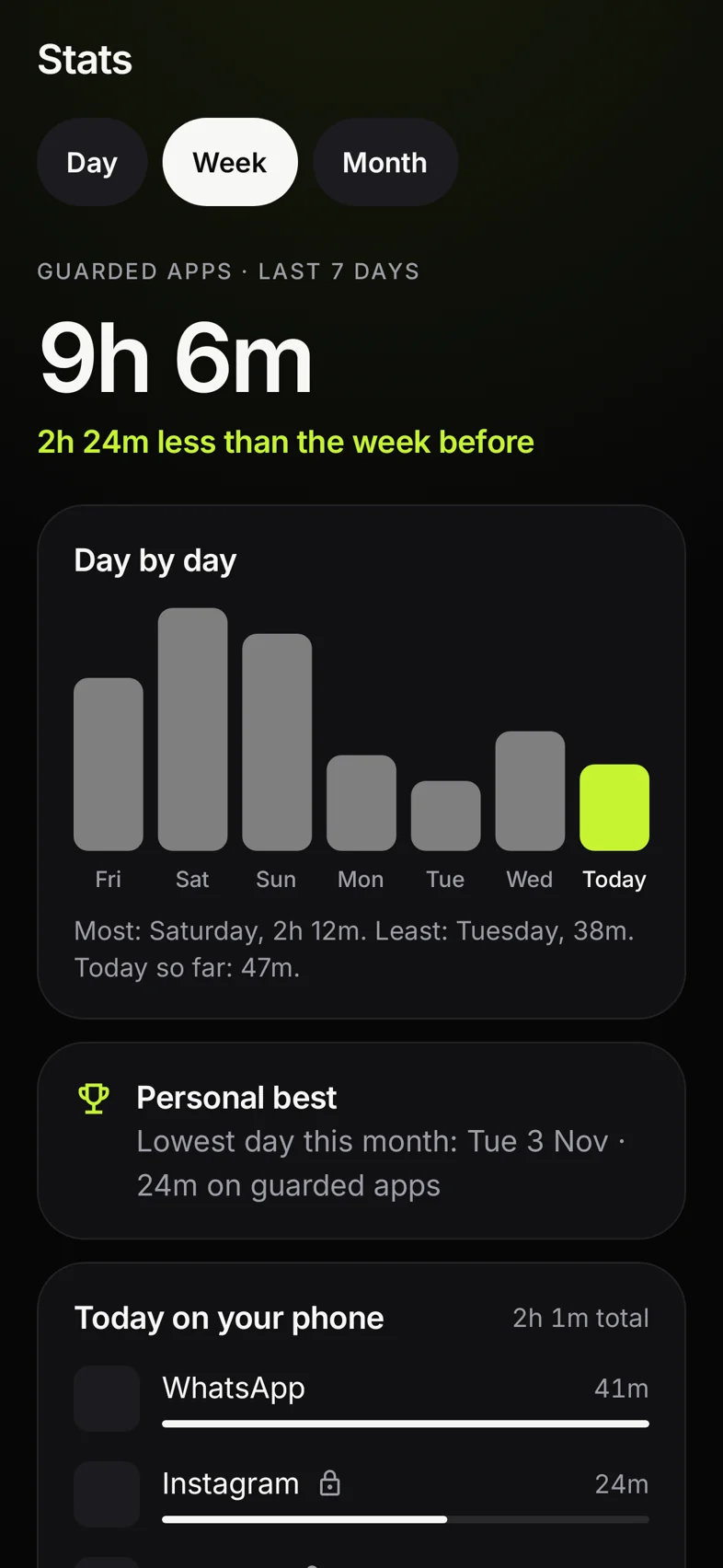
Bouncer reads your phone's own usage data and shows what's really there: time on your guarded apps, phone use after 11 PM, and how often you said Not now. No guesses.
Privacy
Under 18? Setup asks. Then there's no account, no analytics, no notes upload and no weekly coach.
All the details are in our privacy policy.
Strict Mode
Strict Mode is optional and off by default. Turn it on and Bouncer gets much harder to sneak past.
Before you switch it on, the app shows exactly how to turn it off later, in English, Tamil or Hindi. Setting it up with someone? Do it together, never to them.
An honest note: no app on Android can block everything. Strict Mode makes getting around it more effort than the scroll is worth.
Who it's for
NEET, JEE, UPSC, boards: turn scroll breaks into quick revision.
English and aptitude, a few seconds at a time, right where you used to lose them.
Get your evenings back, and still reply to the messages that matter.
Who wants to pick up the phone a little less, and live a little more.
Pricing
The free plan is the real app, not a trial. There's no paywall during setup.
₹0 forever
₹79 a month
or ₹499 a year, about ₹42 a month
FAQ
Not really. A blocker shuts the door. Bouncer asks one easy question first, then lets you choose: go in for a few minutes, or walk away. When you want the door fully closed, Sleep Time, Focus and Exam Mode do that too.
No. The question is a pause, not a game: about 10 seconds, then you choose. Most people come to scroll less and learn a little on the way. There are no leaderboards and nothing to grind.
Yes. Most people pick Quick and easy: fun facts, new words and quick maths, about 10 seconds each. There's also Useful for work, or any topic you like.
Yes. On a chat app like Instagram, a quick pass opens it for 3 minutes with no question, up to 3 times a day. It never works during Sleep Time, Focus or Strict Mode, and it never adds to your limits. Calls and SMS are never guarded.
No. ScrollBouncer only sees which app is open, so it knows when to step in. It never reads your screen, messages, notifications, browsing or what you watch. It does send anonymous events such as “question answered”, without which apps you use. The details are in our privacy policy.
You see the right answer with a short explanation, then another question. No lecture. Or tap Not now and get on with your day. The ones you miss come back later as a quick review.
The app is in English, Tamil and Hindi. Maths, aptitude and general knowledge questions can be shown in Tamil or Hindi too, and any answer can be explained in plain words in all three. Translations need the internet the first time.
Yes. Guarding, routines, the built-in packs, downloaded exam packs and your stats all work offline, and you don't need an account. You need the internet only to download exam packs and for the AI help: your own topics, simpler explanations and translations.
It's your phone, so you can always turn Bouncer off, unless you switch on Strict Mode. Then it can't be uninstalled, routines only get stricter, and changing the date or time doesn't help. No app on Android can block everything, but Strict Mode makes it more effort than the scroll is worth.
You can, but it won't get you in faster. The answers are shuffled every time, so “it's always C” doesn't work. After a wrong answer, the next question waits a few seconds so you can read why, and after two misses in a row Bouncer offers Not now first.
No. Opening Instagram 20 times doesn't make the questions easier; the lock just tells you how many times you've opened it today. Only late at night, from 11 PM to 5 AM, are questions kept light, unless you chose the Strict style.
A copy gets the same question. Copies from apps like Parallel Space, or named “WhatsApp 2”, are caught by themselves. A Dual Apps copy runs where Bouncer can't see, so you tick the app in Protection once; after that, when an app Bouncer can't see stays open for a few seconds, it asks as if it were that app. In Strict Mode this can't be switched off.
In ScrollBouncer, go to Settings, then Strict Mode. Start the wait you picked (1, 6 or 24 hours), then turn it off. Or answer 10 questions and get 8 right to turn it off at once. The app shows these steps in English, Tamil and Hindi before you switch it on.
Set it up with them, not for them. Our page for parents explains what it can and can't do, and how under-18 mode keeps everything on the phone.
Usage access, to know which app is open. Display over other apps, to show the question. Notifications, for reminders. Strict Mode also asks for device admin, used only to stop the app being uninstalled while it's on. This version doesn't use Android's Accessibility service.
Yes. The free plan is free forever: guard 3 apps, every built-in and exam pack, 1 topic of your own, routines, your stats and basic Strict Mode. Pro is optional at ₹79 a month or ₹499 a year, and you see the exact renewal price and date before you pay.
Android 8 and newer. Some phones stop background apps to save battery, so the app walks you through the battery setting that keeps Bouncer awake. There's no iPhone version yet.

Join the waitlist and be first in when ScrollBouncer opens on Android. Invite 3 friends and get a month of Pro free at launch.